custom navbar

Showing posts with label Tech Tuesday. Show all posts

Wednesday, July 29, 2015

Tech Tuesday (on Wednesday!)...Become a Power Point Princess!

If you've been making things for your classroom or TpT for 5 minutes or longer I sure hope you know all about the fabulousness of Powerpoint!  I have always used Word...not cute.  That's all we will say about that.  Enter Photoshop.  One of my besties is a graphic design professor at USC.  She is the ONLY reason I used it as long as I did.  I used it more for scrapbooking than anything else but even that made me crazy and the learning curve is huge!  Once I got serious about putting things on TpT I started nosing around to see what other teachers were using and I kept hearing people say POWER POINT ROCKS!  I of course thought.HUH!?!  What in the world?  How are you using Power Point to bring groovy class stuff to life?  So I started googling and you know it babeeee...it's the bomb!

I'm going to tell you a few of my fav features and then give you some great tutorials that have helped me bring PP to life!  And remember, all of this came from some other brilliant person out there! :)


I love the ability to change fonts!  And when I say change fonts I don't mean from one cute KG font to another!  I mean I can take that baby and do all sorts of things to it!


This is just the beginning of the possibilities.  Once you make a text box and type something, click on it and go up top to format.  Click that and a new box of endless possibilities opens up!


I can move text around without having to say numerous bad words to my computer screen...like might have happened whilst using Word to create anything!


And my final thing I love about Power Point is backgrounds!  I use to spend hours on photoshop making "paper".  This filled my digi-scrapbooking needs but now I am always looking for backgrounds or "papers" to make cool backdrops for my blog posts and products.  When I first started using PP, I was still searching for free papers or creating them in PSE and inserting them.  And then I learned about backgrounds!  

When you open up that presentation for the first time you click up top where it says background and start playing.  You can add patterns with different colors and shapes.  You can make solid backgrounds.  You can make your page look like a chalkboard!  So many amazing choices!  

The biggest thing I would say is PLAY!  Get in there and see what is possible and don't be afraid to make a mess!  You can always hit that back arrow and get back to where you were and if you want to do it soon out there has done it already and a little googling will help you find their post about it!  

Check out these links below for great ideas to make your PP Presentations come alive!

https://www.youtube.com/watch?v=cwdQEOmTA1w
http://www.ladybugsteacherfiles.com/2012/04/designing-printables-with-powerpoint.html
http://www.theschoolsupplyaddict.com/blog/category/video%20tutorial
 post signature

Tuesday, July 21, 2015

Tech Tuesday...Periscope Up!

Okay, so who hasn't heard about Periscope?  


It's okay to raise your hand.  About 8 minutes ago I hadn't either.  And I am still not really sure I get it but I'm going for it!  Why not!?!  I mean YOLO! As my 15 and 9 year old remind me regularly.  HA, I say!  I was the YOLO poster child before YOLO was even a thing my sweet children!

When we returned from TpTVegas15, many teacher bloggers were jumping in and signing up and broadcasting; but 2 weeks ago when that was happening I couldn't figure out what in the world it was or how to sign up so I could see what all the fuss was!  
Today I had a minute and thought it my duty to share some Periscope info with you. I started by  checking out their website.  Useless so don't bother!  I then googled, "What the heck is Periscope!?!"  And my friends, many articles came up!

http://bit.ly/1ecLeRj  This was my fav based on name alone! :)
http://bit.ly/1CLNOnG  This one had a few more points about functionality.
http://bit.ly/1CSzmzy  This one has some tips about why it is good for business!  And I love the name of her blog! :)

I am thinking this might be a fun way to share snippets of classroom life but I need to think that through because I don't want my kiddos faces all over the globe!

So, follow me @teacherlifeisgood on Periscope and maybe I'll figure out something to stream about! :)  If you are already on Periscope, share your handle in the comments so we can follow you!

post signature

Tuesday, July 14, 2015

Tech Tuesday...It Really is Still Tuesday!

So, we've had a little snag in getting into our classrooms this summer. I know, teachers take the summer off to lounge by the pool.  But at the end of last school year, our entire program (5 classrooms) was moved into our main building from fabulous learning cottages with offices and bathrooms.  In teacher language you know that translates to a LOSS OF STORAGE.  For a Primary Montessori teacher this means INSANITY.  But the move meant we lost that precious storage.  Long story for another day but I share the short version now to tell you that this is what I wrestled with all day...Please note that the majority of the furniture at the front of the picture is not even mine!  It was left there.  WHO NEEDS & BIG BOOKSHELVES!?!?


After 8 hours I gave up and wondered if I really accomplished anything and went home.  Tomorrow is another day and I'm a teacher and I have the summer off...so no worries! :)

So, without further ado...here are a few techie tips I picked up in Vegas!


  So it basically lets you repost stuff you love from Instagram!  I find this to be a great way to show the love to the other teacher bloggers you are following!

Next up is the Teachers Pay Teachers App!


I know, you are wondering why in the world I am sharing this but there has to be at least one more person out there that didn't know there was a TpT app!  That's the only way you can hear the cha-ching people!!!  And they told us at the conference that they will soon be updating the app for iPhone!

Ezy Watermark Lite is the way to go to add watermarks to your photos. 


 Learned this from the sweet gals in the Instagram session!  You want those watermarks because you are posting fabulous stuff and people are of course reposting it to Pinterest and you want credit!  It is simple to add the watermark!  Just type your store/blog name on your photo and you are good to go!  There is a paid version too but so far the freebie seems fine.

Last but not least is a favorite of my own from the scrapbooking world!  One tip they taught us at the Instagram session and again in the Pinterest session that I went to is to make collages of your photos. Project Life app is by far the easiest and most fabulous way to do that!


You can pick your size, slide pics in and save and then upload to your favorite social media site.

One that I keep hearing about but haven't checked out yet...


I keep seeing everyone posting Periscope videos so that is on the to-do list before school starts again!

That's it for now but I will share more maps that I learned about next Tuesday!
What is your favorite app for teaching/blogging or TpTing?


post signature

Friday, July 10, 2015

Five for Friday...Vegas Style!

You might have thought I'd skip out on Five for Friday with some lame excuse about Vegas, TpT, blahblahblah.  No way!  I'm here for you!  Straight from Vegas with a load of fun!


I've spent the week vending for this fabulous company!  I'm happy to say that a lot of new teachers know about Bloomz and hopefully will keep sharing the love!  I'm also happy to say, THANK YOU LORD that I am a teacher and not a full time sales rep!  I would never make it if I had to stand from 7am-5pm day after day and tell people about anything!  Even if I did love it as much as I love Bloomz!


Just finished this book!

It was great!  I'm not usually a mystery reader but this was pretty light so that may have been why I liked it.  I am like 137 on the list for my library's e-version of The Husband's Secret by the same author.  Now I can't wait to read it!


WOOOHOOO!!!  We started with networking yesterday morning and haven't stopped!  So far, this has been the best teacher conference ever!  In the next few weeks I will post more about it but it has been fabulous!  We started the adventure with this fabulous schwag bag!

Filled with all sorts of great stuff from Scents, Go Noodle, TpT, SDE, Ellison and more!

And let me tell you, I have met some amazing people along the way!  Everyone in this crew is going to be part of the millionaire club in a skinny minute!


Do you know about these?!?  I know, I know, Im a little behind but my new bloody friends introduced them to me in Vegas!  Alex and Ani Bracelets!  Love them!  


Now the problem is deciding which one...or ones...to buy!


The daytime view!


The nighttime view.
It's a wild and crazy place!

Lot's more to tell but not now!  Hop back over to Doodle Bugs Teaching and see what others are talking about this fine Friday!


post signature

Wednesday, July 8, 2015

Tech Tuesday on Wednesday!

I know, it's Wednesday and I'm doing a Tech Tuesday post but...Vegas...  
What more can I say!?!

I know I've mentioned how fabulous the Bloomz parent teacher communication app is but since I'm here in Vegas showcasing it for them I've been playing with it a lot and loving it even more!  My latest find is the Parent Teacher Conference sign up feature!  It is AMAZING!


First off you see this screen.  This is where you get to decide what your schedule will look like.  Do you want a lunch break?  How long should each conference last?  How much time do you want between them?  And the screen shot doesn't show it but right below notes is an alert option to alert you to the next conference if you'd like!  WHAT?!?


Once you have logistics set click next and here is your sign up sheet!  You can go in on this screen and trash times you don't want to make available!  Click next again and you can choose who the sign up goes to.  So, if it's whole class, great but if it's just one parent you have that option as well!


Click done and one more screen pops up.


A neat and tidy email to your parents letting them know they can sign up.

We all know that plans change and schedules get wonky so if that happens, rather than the typical 87 phone calls back and forth about a new time, parents can hop right back on Bloomz and erase their time releasing it to others to sign up for and they can pick a new time! 

How stinkin fabulous is that?!?  If you haven't signed up yet, you probably better do it now!  


Tuesday, June 30, 2015

Tech Tuesday...Pinterest Style! Let's get it Under Control People!

If you've known me for 5 minutes you know that I L.O.V.E. Pinterest!  I am a little obsessed with the whole notion of it.  As in I have pinned 7, 673 things.


I am one of those crazy people that actually does a LOT of the things that I pin!  
No, I have not accomplished all 7,673 (yes, I really had that many when I wrote this post) but I've given it a lot of good effort.  All of my best recipes, Montessori ideas, cool quotes and room makeover ideas came from Pinterest.  So with all this Pinterest love going on, my boards were a mess!  I have 175 boards.  I know, I know, who does that?!?!  But that's me!  

So last summer I had to get organized because I couldn't find anything and I was wasting more time pinning than using the great info.  I got the crazy under control with a few simple (but time consuming) fixes.  
I started by Alphabetizing my boards.  Now you are probably thinking, "what teacher in her right mind wouldn't have done that from the get go?!?"  This one my friends.  This. One. Right. Here.
This was not fun and took a hefty amount of time but when I did the alphabetizing it actually made me take a look at boards, add new ones, consolidate some and trash some altogether.  Let's start with alphabetizing though.
It's easy peasy!  You can only do it on a desk top and it's as simple as drag and drop.  Open those boards up, click on the board you need to move and drag it to where it needs to be.  While you're in there take a look at those boards that you haven't looked at in for ever and clean it up people!
Super easy too!  Click on edit and you will get this screen.  Get in there and change it up.  If you added a recipe to your language and literacy board click on name and get it to the right spot!  Get those math lessons out of laundry room makeover!
Expand boards that need it!  I started with one Christmas broad that had a zillion pins so I broke them all up into individual boards so I could actually find stuff.  
I am also in a constant mode of deleting things I don't care about, don't want, ain't never gonna try.  I do that each time I pin.  It's sorta like that rule about add something new to your closet, take something out.
So now is the time.  For Pete's sakes, you're a teacher and have the summer off!  What else do you have to do with your time but clean up your Pinterest boards?!?  Have fun!
 post signature

Tuesday, June 23, 2015

Tech Tuesday!


I know, I'm a little tardy with the post, but this teacher, yeah, the one who doesn't work during the summer, has been at school all day! :)  But I didn't want to miss out an sharing my latest technological obsession passion with you!  Get a cool drink because this is pretty long!

If you have been following me for 5 minutes than you know that I am really just getting started with all this blogging stuff.  I have been in the blog world for about 6 years but I haven't ever taken it seriously enough and I haven't liked what I had to offer well enough to put it out there but I decided it was time to take the plunge and make it happen.  So, I shared my blog with my ENTIRE school!  Yes mam!  When the chick down the hall is reading, you better keep up with it!  So, as a result I have spent the last 3 weeks (AKA the beginning of summer vacation) sitting at the computer.  It's a good thing though because it's summer and i have time on my side!

I'm telling you all of this because a few friends have asked for help and I have been sending emails to share my journey and links to sites I love!  Why keep that a secret!  Everything you could ever want to know about blogging is a simple Google search away!

These are some of my favorite blogs. Some I like for style ideas and some I get great content ideas from. I usually check them out as often as I can and see what they have that I want, how they ordered things, what link parties etc they are doing. They change a lot . Nothing major but subtle changes that make the site just a little bit better.


There are some amazing blog designers out there who you can pay to design for you but that isn't in my budget just yet so I poured over my favs for design ideas and made a list and googled what I liked. So for instance...the navigation bar at the top that has the icons for Facebook, Pinterest, Twitter etc was created using image mapping. I started by making my header in photoshop but that was incredibly cumbersome for a non PS expert so I switched over to Power Point and I am in love! Here are some great blog posts to help with that!


Once my header was created, I saved it as a PNG and then load it to an image mapping site and mapped links to the different social media outlets. My 15 year old helped with that but it wasn't hard! Check out this site for image mapping help.


There are plenty of great blogs out there that are focused on helping you make a fabulous blog! These are some of my favorites!

http://thecutestblogontheblock.com - this is an amazing blog full of all sorts of free tutorials, backgrounds etc to get you going. I have been using them as a resource FOREVER.

http://www.theminimalists.com/blog/ - just came across this one. Very easy step by step process for building a blog.

http://www.teachjunkie.com/?s=blogging - a real live teacher with a wealth of information on the topic!

http://www.livingwellspendingless.com/?s=blogging - she has an ebook that she will send you that is really good!


Hope this helps!
post signature


Tuesday, June 16, 2015

Tech Tuesday!

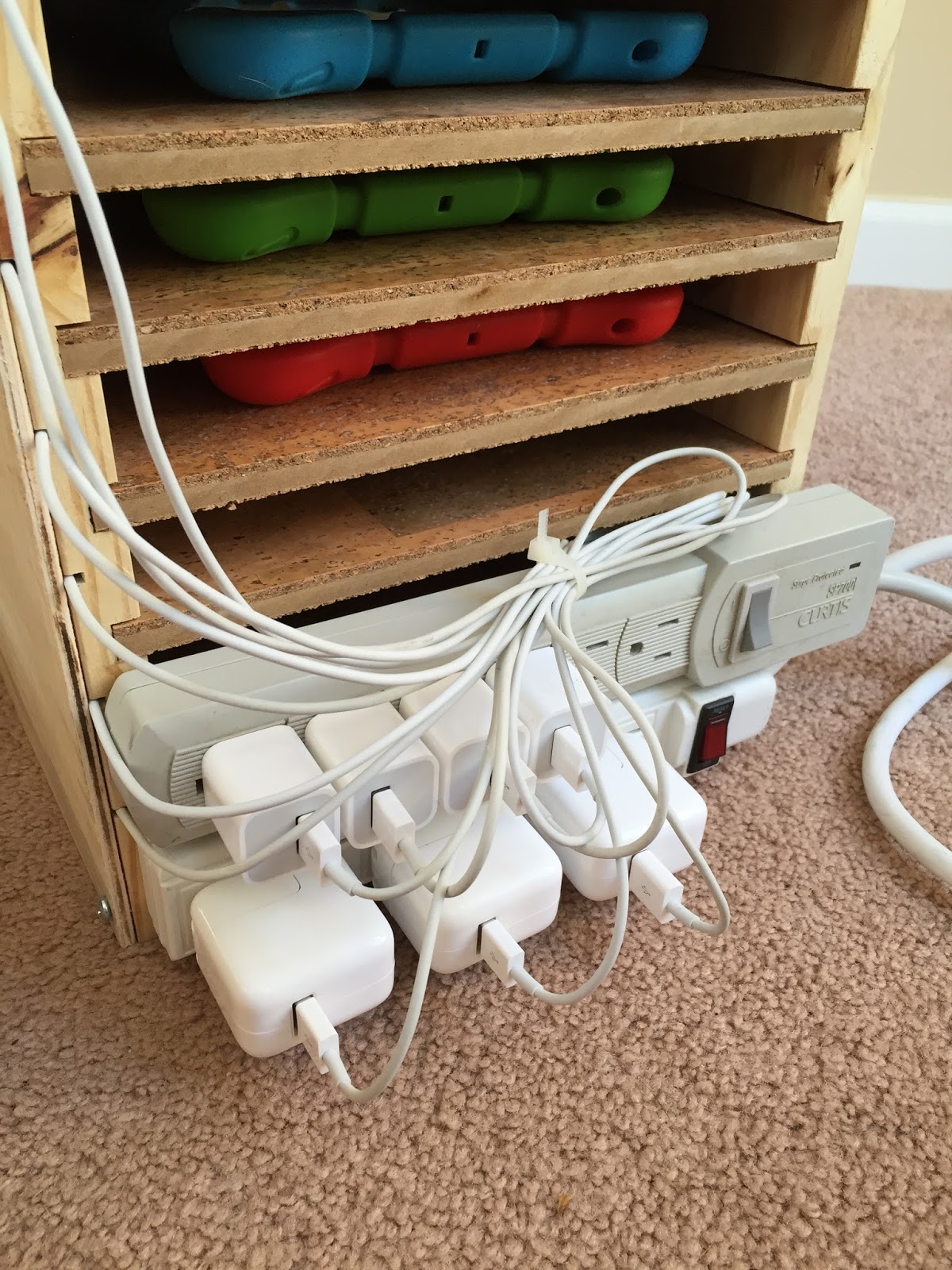
Today I'm sharing a little organization technique that I use for my iPads.  This grew out of a need to manage my ever growing supply of iPads!  I was lucky enough to have a Donors Choose grant fully funded and that got me 4 iPad minis and cases.  I am also lucky enough to work in a school that has given my kiddos access to 3 additional iPads.  So, with all this fabulous technology there had to be a way to store it all.  The picture below is ever a work in progress.  


The hubs made this stand originally without the cord access on the front.  Now, if you have small people (3-6 year olds) handling technology in your classroom you know that a multitude of problems can arise.  One of which was trying to manage cords and charging.  So after living with it for a few months it came home and he added tracks on the side for each cord to go to a particular shelf.  He then cover it with another piece of wood which of course is easily removed.  The cords move freely in the track so they can be pushed or pulled however needed.  


This helped a lot with keeping them charged and organized.  This has not helped with cuteness.  I'm just not feeling all the cords.  So, back to the drawing board again.  I've added zip ties to keep the cord mess at bay in the back of the system and I added tags to each of the cords and labels to each of the shelves and each of the iPads in order to keep track of which cord goes to which iPad on which shelf.  


We won't know how this works until school starts again but I am thinking its a good thing!

If you are looking for ways to store your iPads and a whole lot more, check out my Pinterest Board iFun!
Related Posts Plugin for WordPress, Blogger...