custom navbar

Showing posts with label technology. Show all posts

Friday, July 17, 2015

Five for Friday!

Here we are again!  Another Friday of summer is almost done!  Can hardly believe the speed that this summer is flying by at but it's been a good good summer so far and I am a happy camper!  So, without wasting another minute of your precious summer time...let's go with Five for Friday!

Who's a super lucky girl!?!  This one right here!


The hubs and I celebrated our 11th anniversary on July 4th and this was my gift!  I had looked at them and decided it was just too much to spend and then he surprised me with it!  It is fabulous and awesome and lovely!


Yeah, I'm a chicken chick and if you follow me on Instagram you will often see pics of my girls.  This is Sweetie and she is my favorite!  She is hunkered down because this is the stance she takes when she thinks I am going to pick her up!  She loves to be held but I think its more because I bring her snacks than because she wants to snuggle! :)  I hatched her in my classroom, along with 16 more last school year.  I brought her and 4 more home and she was the only hen in the crowd!  


In light of the fact that I live in a neighborhood...with an HOA...and a no chicken policy, the roosters had to go!  But Sweetie stayed and I bought 3 more hens from the flea market and they all hang out and give me fresh eggs every day!  I could be a farm girl in a heart beat! 


This kid right here.  What a joy to be his mom!  He's 15 going on 25 some days and 5 other days but he's mine and I couldn't be prouder of the young man he is becoming!  He and I are heading to Nicaragua with some members from our church for a week long mission trip.  This will be his first and my 4th.  Can't wait to see how God works in our lives while we are there!


Today was immunization day!   The Dr. gave him a sticker for being brave! :)


I was number 873 on the wait list but I finally got it!  Great read so far but one that you have to stay with or you get lost fast!

gone girl


It's been a crazy, anxious, stressful summer while my team and I wait to get into our classrooms.  Many of you know how that goes so I won't even go there.  Needless to say they finally let us in this week.  Hallelujah! Praise Jesus!  Was my response to the email our lead teacher sent out!


hot mess classroom pic

This is after 12 hours of work.  And I work pretty fast!  Good news is, I have 2 weeks left so it will get done!  Stay tuned for more progress pics!

Hope you have a delightful weekend and be sure to check out the other Five for Friday posts back over at Doodle Bugs Teaching!


post signature

Tuesday, July 14, 2015

Tech Tuesday...It Really is Still Tuesday!

So, we've had a little snag in getting into our classrooms this summer. I know, teachers take the summer off to lounge by the pool.  But at the end of last school year, our entire program (5 classrooms) was moved into our main building from fabulous learning cottages with offices and bathrooms.  In teacher language you know that translates to a LOSS OF STORAGE.  For a Primary Montessori teacher this means INSANITY.  But the move meant we lost that precious storage.  Long story for another day but I share the short version now to tell you that this is what I wrestled with all day...Please note that the majority of the furniture at the front of the picture is not even mine!  It was left there.  WHO NEEDS & BIG BOOKSHELVES!?!?


After 8 hours I gave up and wondered if I really accomplished anything and went home.  Tomorrow is another day and I'm a teacher and I have the summer off...so no worries! :)

So, without further ado...here are a few techie tips I picked up in Vegas!


  So it basically lets you repost stuff you love from Instagram!  I find this to be a great way to show the love to the other teacher bloggers you are following!

Next up is the Teachers Pay Teachers App!


I know, you are wondering why in the world I am sharing this but there has to be at least one more person out there that didn't know there was a TpT app!  That's the only way you can hear the cha-ching people!!!  And they told us at the conference that they will soon be updating the app for iPhone!

Ezy Watermark Lite is the way to go to add watermarks to your photos. 


 Learned this from the sweet gals in the Instagram session!  You want those watermarks because you are posting fabulous stuff and people are of course reposting it to Pinterest and you want credit!  It is simple to add the watermark!  Just type your store/blog name on your photo and you are good to go!  There is a paid version too but so far the freebie seems fine.

Last but not least is a favorite of my own from the scrapbooking world!  One tip they taught us at the Instagram session and again in the Pinterest session that I went to is to make collages of your photos. Project Life app is by far the easiest and most fabulous way to do that!


You can pick your size, slide pics in and save and then upload to your favorite social media site.

One that I keep hearing about but haven't checked out yet...


I keep seeing everyone posting Periscope videos so that is on the to-do list before school starts again!

That's it for now but I will share more maps that I learned about next Tuesday!
What is your favorite app for teaching/blogging or TpTing?


post signature

Wednesday, June 17, 2015

WOW Wednesday

I'm so sorry... I couldn't resist!  Love that camel!
It's also...


I'll share a quick pic of whats going on in my world, a tip, a trick, maybe a freebie and you can do the same and link back!

So incredibly excited that I get to attend the Teachers Pay Teachers 2015 Conference!  I will be vending for the most fabulous Bloomz at the SDE Conference at the beginning of the week and then I will be attending the TpT Blogging Conference on the 9th & 10th!  It's getting' real people!  Come see me at the Bloomz vendor table and I'll give you a prize!  In the meantime I just found out about this little party that I will absolutely attend!  Who's gonna be there!?!

Be sure to add your link in the comments!  I'm working on learning how to use inlinkz but until then you can add in the comments!

Tuesday, June 16, 2015

Tech Tuesday!

Today I'm sharing a little organization technique that I use for my iPads.  This grew out of a need to manage my ever growing supply of iPads!  I was lucky enough to have a Donors Choose grant fully funded and that got me 4 iPad minis and cases.  I am also lucky enough to work in a school that has given my kiddos access to 3 additional iPads.  So, with all this fabulous technology there had to be a way to store it all.  The picture below is ever a work in progress.  


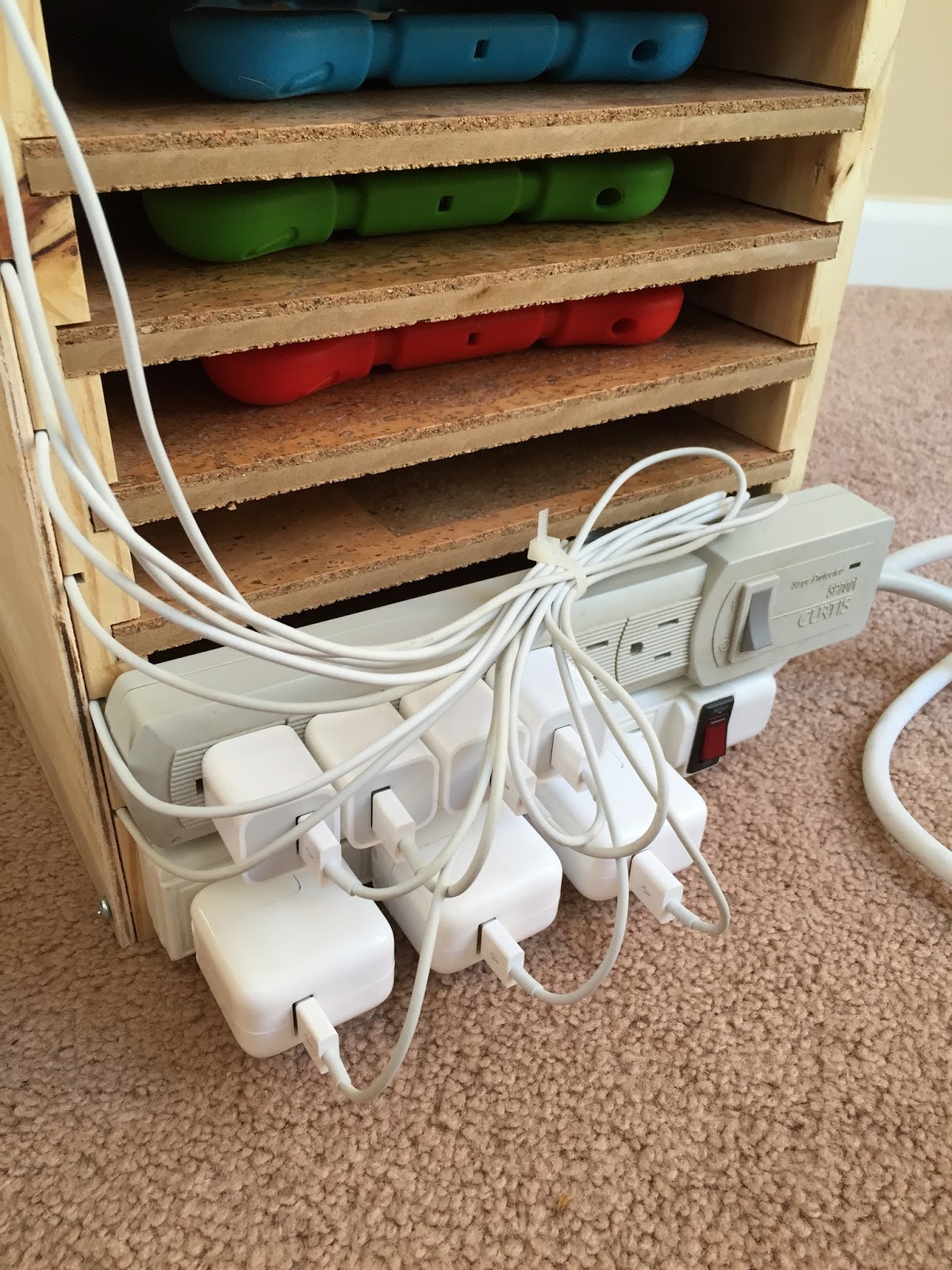
The hubs made this stand originally without the cord access on the front.  Now, if you have small people (3-6 year olds) handling technology in your classroom you know that a multitude of problems can arise.  One of which was trying to manage cords and charging.  So after living with it for a few months it came home and he added tracks on the side for each cord to go to a particular shelf.  He then cover it with another piece of wood which of course is easily removed.  The cords move freely in the track so they can be pushed or pulled however needed.  


This helped a lot with keeping them charged and organized.  This has not helped with cuteness.  I'm just not feeling all the cords.  So, back to the drawing board again.  I've added zip ties to keep the cord mess at bay in the back of the system and I added tags to each of the cords and labels to each of the shelves and each of the iPads in order to keep track of which cord goes to which iPad on which shelf.  


We won't know how this works until school starts again but I am thinking its a good thing!

If you are looking for ways to store your iPads and a whole lot more, check out my Pinterest Board iFun!

Tuesday, June 9, 2015

Tech Tuesday

There are a myriad of technology choices out there for communicating, creating, organizing and surviving in the classroom.  I've dabbled with a few different choices in my classroom and a few months ago I shared my new love, Bloomz! So, I thought I would make Tuesday a day to share my latest tech find with all of you.  For this week, I want to share a little bit more about Bloomz as there seems to be quite a buzz about it around the web.
Having used a variety of communication apps in my classroom, I thought I would compare Bloomz to Remind 101 as it seems to be used by many and a lot of people have questions about how the two compare.

Remind 101 is a solid app that I used for most of the past school year.  My son's teacher used it as well so I experienced it form a parent and a teacher standpoint.  It was instantaneous, short and sweet.  I likened it to a tweet or a short text. It was okay.  But okay just isn't good enough for me.  I was limited on characters so had to make my messages as short as possible or send multiple messages.  In my mind, multiple messages defeats the purpose of Remind.  It's supposed to be short and sweet.  I always felt like I needed just a little more information when I got messages from my son's teacher as well.  Another huge deficit of Remind 101 is that the communication is one way.  I could send out a short little message but if it wasn't understood or if there were any questions, I got calls, texts and emails seeking clarification.  Frankly, that was a waste of everyone's time and many times I just skipped Remind and used Facebook instead.  It is my understanding that parents can now respond but even with the change, it is still just a messaging app.

Bloomz solves these problems and does so much more!  Like Remind, I can send a message or reminder and it immediately posts to a parents phone.  This is big.  In this day and age, parents are too busy to stop and check email as often as we would like and I am not interested in sending out 20 text messages to share quick reminders.  Difference is, with Bloomz I can send a short or long message with as little or as much detail as I want.  I can add a picture, a sign up, a reminder, etc or I can just send a sentence.  As a bonus, I end up building our classroom community because my post can be commented on by others so then we have a conversation going on rather than just a message from me.  This allows families to make connections, get to know one another and in some cases help one another out so I am not always the keeper of all classroom information.  I'd say the biggest plus of Bloomz over Remind101 is that it has so many more capabilities beyond simple messaging and as a result, I only need to use one app - Bloomz - to take care of all communication needs.

Click here and check it out this summer and you won't be disappointed!   

Monday, March 30, 2015

Bloomz! It's the Bomb!

Recently, I was one of those lucky teachers who got to hop on a plane with a bunch of my coworkers and fly to a national conference.  This one happened to be a much needed shot in the arm for a myriad of reasons!  That isn't always the case so this was a welcome and pleasant surprise.  The conference was the American Montessori Society Annual Conference held in Philadelphia.  Lots of great things learned that I will share but one thing that really stood out was a visit with a vendor!

As we wove in and out of the vendor isles oohing and ahhing over all the great product that wouldn't fit into our suitcases we happened upon Chakrapani Appalabattula and his fabulous app Bloomz!  He greeted me with a smile and a quick question. "How do you communicate with parents?"  Not sure if he knew but this is something that I simultaneously love and hate as I search for new and better ways to streamline how I communicate with as many parents as possible.

I have used Facebook, Remind 101, Blogger, Three Ring, text and email to name a few electronic methods.  I've also used, calendars, take home folders, paper notes, weekly newsletters and stickers on t-shirts as old school methods.  It's Just. Too. Much.  So as I rattled off all these methods to Chaks (he immediately had us on a nickname basis cuz he's cool like that!) he grinned and waited patiently  until I ran out of breath and then he said, "I've got the answer!"  I'm a sucker for an app so I jumped all over it!

I was thrilled as I stood there and played but when I got back to my room and played some more I was blown away!  This covered all of it.  Calendar, Facebook, messaging, field trip sign ups, announcements, photographs, volunteer sign ups and more!  I have used it with my families for the last few weeks and we are encouraging teachers to use it school wide so that it can become the way our entire school communicates with families in the coming school year.  Feedback from families so far is great!

No more blogs, newsletters, Facebook, Remind101, etc!  Now families will find everything they need in one easy to maneuver spot and I will not feel like a crazy person while I try and remember if I posted everywhere I needed to!

Check it out!  It's FREE and FABULOUS!  www.bloomz.net
Related Posts Plugin for WordPress, Blogger...